


NextGen Performance Optimization: Improving EHR & Practice Management Speed, Stability, and Usability


Related articles:
Is Your Practice Ready for MVP Reporting? A NextGen Readiness Audit for the MIPS Transition
Read ArticleTraditional MIPS Is on the Way Out: What the MVP Transition Means for NextGen Practices
Read Article2027 Healthcare Compliance Readiness: HIPAA Security, Digital Accessibility, and Electronic Prior Authorization
Read ArticleA Slow or Difficult NextGen Environment Affects the Entire Organization
A NextGen environment rarely slows down all at once. Templates and charts load slower, scheduling and registration lag, and reports and billing work start falling behind until workarounds and recurring complaints become the norm. These aren't isolated glitches.
They're signs that NextGen EHR or NextGen Practice Management performance is quietly declining, and the cause is rarely just one thing. It can come from infrastructure, reports, slow queries, configuration, workflows, or daily user habits. At TempDev, our goal is to make healthcare workflows work better with NextGen performance optimization that gives your organization a structured way to find out the source of the problem, fix what matters most, and keep work flowing.
What Is NextGen Performance Optimization?
NextGen performance optimization is a structured review and improvement of the technical and operational factors affecting the system. It encompasses database and SQL performance, application, server, and system configurations, as well as network and workstation stability. The process also evaluates template design, reports and queries, interfaces, workflow efficiency, user training, and ongoing maintenance and monitoring processes.
Please note that optimization is not simply making the software run faster. It is improving the overall ability of staff and technology to complete work reliably, which is why successful NextGen system optimization always considers both sides of the equation together.
When Does an Organization Need Performance Optimization?
Some warning signs are easy to recognize. Others build slowly enough that staff assumes they are normal.
NextGen screens or templates load slowly.
Performance varies significantly by user, location, or time of day.
Reports regularly time out or affect other users.
Users experience freezing, errors, or disconnected sessions.
Interfaces develop unexplained delays or backlogs.
Performance declined after an upgrade or configuration change.
Older custom content has become difficult to maintain.
The database has grown significantly.
Users complete excessive clicks or unnecessary navigation.
Staff relies on paper, spreadsheets, or other workarounds.
Technical teams repeatedly address symptoms without finding the cause.
The organization is expanding or adding users, locations, or services.
Optimization can be proactive, addressing risk before it grows, or reactive, responding to an established performance problem.
Begin With a Complete View of the Problem
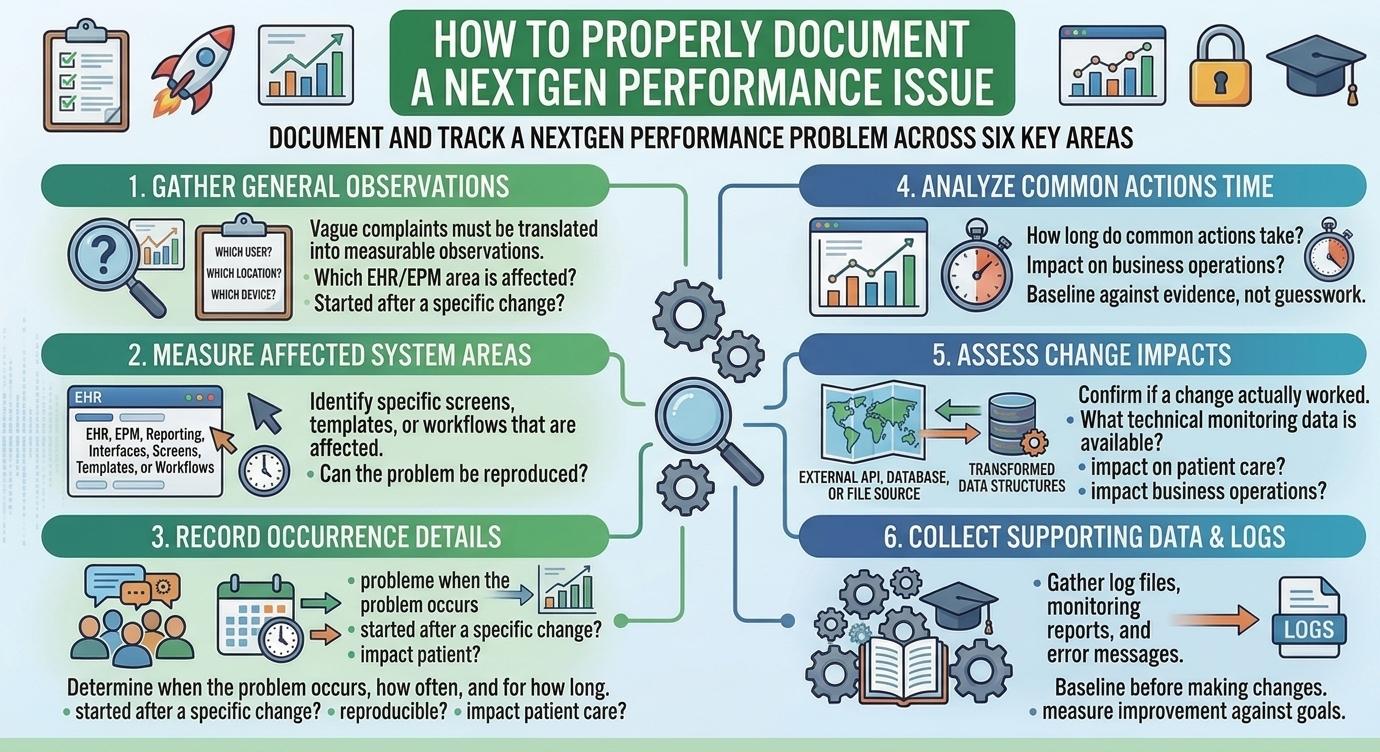
A general complaint like "NextGen is slow" is not specific enough to act on. Therefore, the first step in any NextGen system optimization project is translating vague complaints into measurable observations: which users, locations, devices, and specific areas such as EHR, EPM, interfaces, reporting, screens, templates, or workflows are affected.
You must also determine when the problem occurs, how long common actions take, whether it started after a specific change, if it can be reproduced, what technical monitoring data is available, and how the issue ultimately impacts patient care and business operations.
This groundwork matters because it prevents teams from making changes based on assumptions and creates a baseline that later confirms whether a fix actually worked.
What a NextGen Performance Review Should Evaluate
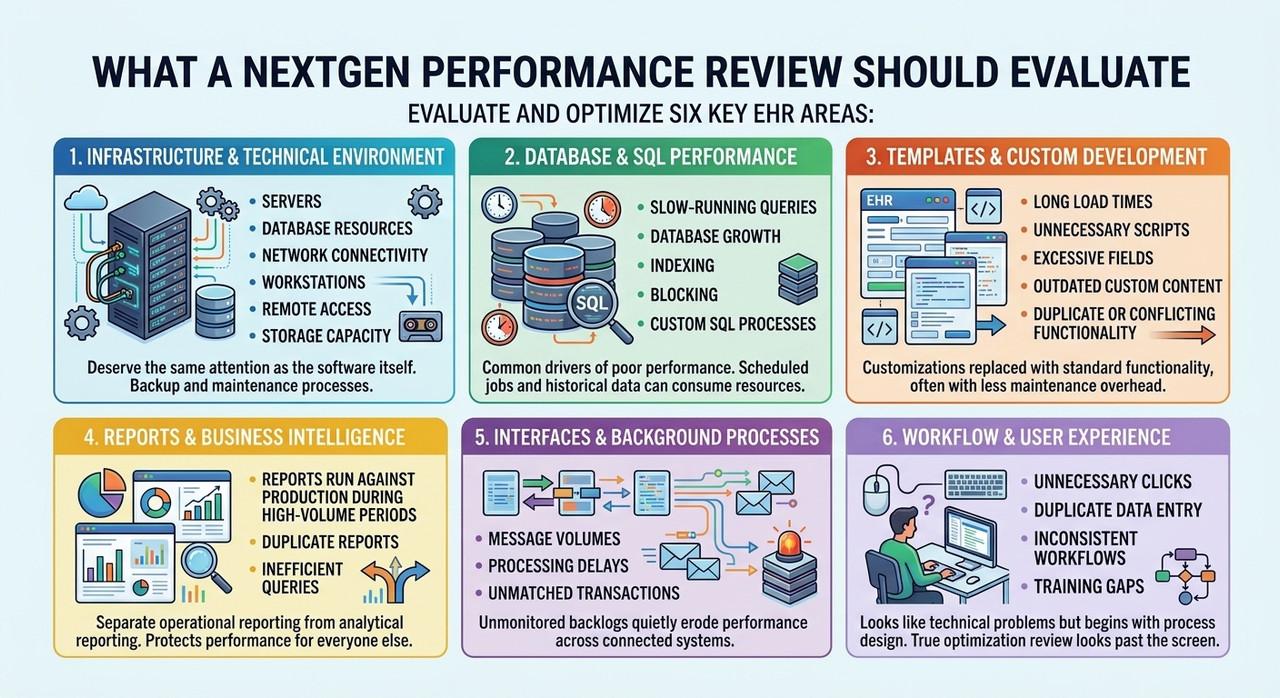
Infrastructure and Technical Environment
Servers, database resources, network connectivity, workstations, remote access, and storage capacity all shape day-to-day NextGen EHR performance. Backup and maintenance processes deserve the same attention as the software itself.
Database and SQL Performance
Slow-running queries, database growth, indexing, blocking, and custom SQL processes are common drivers of poor NextGen database performance. Scheduled jobs and historical data can quietly consume resources long after they stop being useful.
Templates and Custom Development
Long load times, unnecessary scripts, excessive fields, outdated custom content, and duplicate or conflicting functionality all affect NextGen EHR usability. Customizations that once solved a problem can eventually be replaced with standard functionality, often with less maintenance overhead.
Reports and Business Intelligence
Reports that run against production during high-volume periods, duplicate reports, and inefficient queries all slow the broader system. Separating operational reporting from analytical reporting protects performance for everyone else.
Interfaces and Background Processes
Message volumes, processing delays, and unmatched transactions affect more than the interface itself. Left unmonitored, interface backlogs can quietly erode NextGen EHR performance across connected systems.
Workflow and User Experience
Unnecessary clicks, duplicate data entry, inconsistent workflows, and training gaps often look like technical problems but begin with process design. Because of that, a true optimization review always looks past the screen and into the workflow behind it.
Separate Technical Performance From Workflow Performance
Users often describe both issues the same way: the system is slow. Technical performance problems involve response times, database bottlenecks, network delays, and interface backlogs. Workflow performance problems involve extra steps, duplicate entry, unclear responsibilities, and missing automation.
An organization may need technical remediation, workflow redesign, or both. Confusing the two often leads to the wrong fix and continued frustration.
Prioritize Improvements Based on Impact
Optimization should follow a controlled plan rather than a series of unrelated fixes. Patient-safety and business-continuity risks come first, followed by issues affecting large numbers of users. Teams should separate quick wins from long-term infrastructure projects and avoid changing several components at once without testing.
Establishing a baseline before making changes, and defining how improvement will be measured, keeps NextGen system optimization grounded in evidence rather than guesswork.
Test Changes Before Introducing Them to Production
Optimization work requires validation. Testing technical changes in a non-production environment, using realistic workflow and volume scenarios, and measuring performance before and after each change all reduce risk.
Templates, reports, interfaces, and connected systems should be tested together, with representative users and a documented rollback plan, before anything reaches production.
Monitor NextGen Performance Over Time
Performance optimization is not a one-time project. Establishing baselines, monitoring system resources, and tracking recurring complaints all help organizations catch developing problems early, while regular index and maintenance reviews protect NextGen database performance as data volume grows.
According to AHRQ's research on electronic health record usability, ongoing attention to system design and workflow has a direct effect on both safety and efficiency. Reassessing capacity as the organization grows protects NextGen EHR & EPM performance well beyond the initial project.
How Performance Optimization Helps Work Flow Better
When done well, NextGen performance optimization reduces delays in clinical and administrative work and helps users spend less time waiting or repeating tasks. It reduces workarounds, improves access to reports, and gives technical teams clearer insight into recurring problems.
Just as important, it improves NextGen EHR usability for the people who rely on the system every day, supporting growth without letting the environment become harder to use over time. The NIST Health IT Usability program makes a similar point: usability and performance are closely connected, not separate goals.
How TempDev Uncomplicates NextGen Performance Optimization
TempDev brings deep knowledge across NextGen EHR and EPM, spanning technical, database, reporting, interface, and workflow expertise. We review SQL performance and system configuration, evaluate templates and custom content, and assess reports and interfaces alongside real workflow behavior.
Because we look across the complete environment rather than addressing each symptom in isolation, our recommendations are grounded in both technical findings and user experience. Learn more about our NextGen EHR consulting and NextGen EPM consulting services, or read how NextGen EHR usability can increase productivity across your organization.
Create a Faster and More Reliable NextGen Environment
NextGen database performance problems deserve investigation across infrastructure, databases, custom content, reports, interfaces, and workflows, not a single quick fix. If it has been a while since your last review, our Spring Clean your NextGen PM & EHR checklist is a practical place to start.
Contact TempDev today to discuss NextGen performance optimization for your organization.
Interested?
Agree with our point of view? Become our client!
Did you enjoy this read? Feel free to share it with your contacts.