


Chronic Care Management 2.0 Template Suite for NextGen EHR


Related articles:
Introducing the Chronic Care Management 2.0 Template Suite
Read ArticleCare Coordination in Chronic Disease Management
Read ArticleStrengthening Referral Management in Coordinated Care Programs
Read ArticleMaking Chronic Care Management Easier to Track in NextGen EHR
The concept of running a Chronic Care Management program sounds easy. You get to check in on your most vulnerable patients between their regular appointments, help them manage their medications, and keep them out of the hospital. But in reality, actually running one of these programs can feel like an absolute administrative nightmare. Most care managers I talk to feel like they spend half their day clicking through twenty different screens, hunting down paperwork, and manually counting up minutes on their fingers instead of actually talking to the people who need help.
When your system is that clunky, things inevitably slip through the cracks. A care manager might spend forty-five minutes coordinating a complex specialist referral for a patient, but if logging that time is a giant hassle, it doesn't get documented. And if it doesn't get documented, your practice cannot bill for it. Chronic Care Management isn't just a compliance box you check or a static form in your EHR. It's a living, breathing clinical workflow. To make it work without burning out your staff, you need a system that keeps enrollment, consent, care plans, and timers all in one easy place.
Why Chronic Care Management Workflows Break Down
The biggest reason these programs stall out is that the rules for getting reimbursed are incredibly strict. To keep everything audit-proof and compliant, your team has to juggle a massive mental checklist every single month. You have to prove the patient gave verbal or written consent, keep an active list of their chronic conditions, track every bit of communication, hit precise monthly minute targets, and send clean logs to billing.
When your care team has to do all of that without a clear roadmap, the wheels fall off. Care managers lose track of who is actually due for their monthly phone call. They cannot easily tell who officially opted into the program versus who changed their mind and declined it. Without a clear view of deadlines and due dates, your staff is always going to be playing catch-up, which leads to major gaps in patient care and a lot of lost revenue.
The Operational Problem With Scattered CCM Documentation
In a lot of busy clinics, CCM data is all over the map. Consent might be on a scanned paper form buried in the chart, the clinical notes are typed into a generic telephone template, and the monthly minutes are tracked on a sticky note or a standalone desktop timer. It is a completely fragmented way to work, and it drives practice administrators crazy.
When your data is split up like that, you lose the big picture. Your care team cannot easily collaborate because nobody can see the patient’s full story on one screen. Care managers end up wasting valuable time opening and closing different templates just to log a quick three-minute update. Even worse, it makes auditing your charts next to impossible. If your billing codes do not perfectly match your clinical documentation, you are taking on a huge financial risk if an auditor ever comes knocking.
What a Strong CCM Workflow Should Support
To run a smooth, profitable program, your medical billing workflow needs to support your staff from day one. A great setup should instantly tell your team who is actively enrolled and exactly when they started. It should make capturing and viewing patient consent completely foolproof, so you always know you are compliant before you start tracking a single minute.
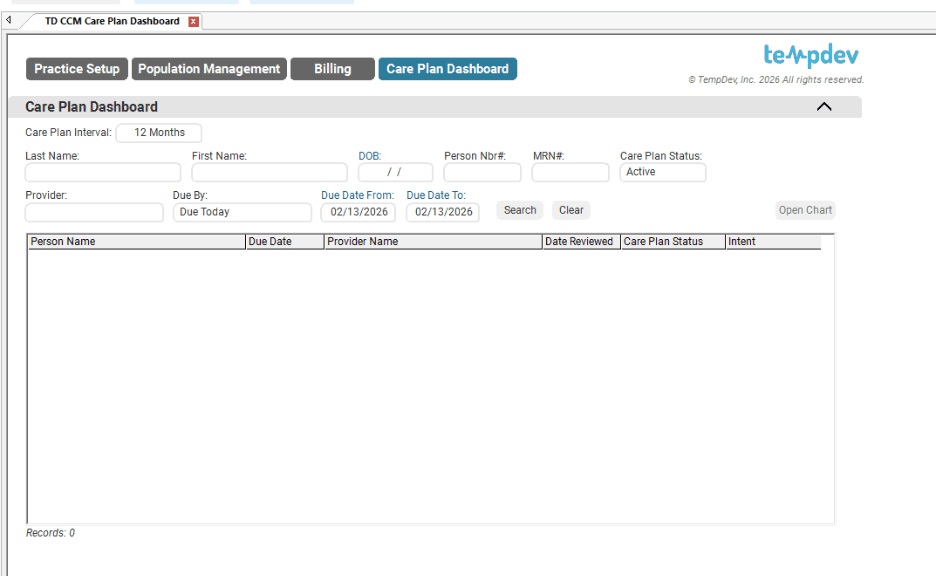
Your care managers also need a simple dashboard that shows them upcoming due dates, recent patient touchpoints, and the current status of every care plan. They need to be able to log calls, update goals, track face-to-face visits, and send tasks to providers without fighting the software. Finally, all those minutes should automatically roll up and head straight to your billing team. When the clinical side and the financial side talk to each other, you protect your revenue and give better care.
How TempDev’s Chronic Care Management 2.0 Template Suite Helps
If your practice uses NextGen EHR and NextGen EPM, you do not have to settle for a clunky, broken process. TempDev’s Chronic Care Management 2.0 Template Suite was built specifically to bring some sanity back to your care coordination workflows. It is a game-changer for practices that have upgraded to NextGen Enterprise 8.3.1, giving you the exact layout you need.
Instead of just adding more fields to fill out, this suite re-engineers the whole process around three core pillars. It simplifies your initial practice setup, gives you total visibility into your patient population, and makes documenting your time incredibly easy so your staff can focus on what they do best.
Practice Setup Improvements for CCM Configuration
A great program requires a solid foundation. The improved practice setup templates in the CCM 2.0 suite let your operations leaders configure your chronic condition rules right from the start. You can easily map out which diagnoses qualify, set up standard care guidelines, and build rules that actually match how your clinic operates.
To keep your team moving fast, the suite adds clean navigation tabs right at the top of the screen. Your staff can jump from population dashboards to clinical care plans and billing reviews without endless scrolling or searching. Cutting out those extra clicks goes a long way toward reducing software frustration.
The CCM Care Plan Dashboard
Managing hundreds of chronic patients means you can't open charts one by one to find who needs a call. The CCM Care Plan Dashboard acts as your central command center. It gives your care management team a bird's-eye view of your entire caseload on a single screen.
The dashboard clearly displays upcoming due dates, active enrollment statuses, and exactly how many minutes have been logged for the month. Your team can sort, filter, and search by patient name, ID number, or specific conditions in seconds. If a care manager sees a patient nearing billing threshold, they can trigger a follow-up directly from the chart. It keeps your team organized and ensures no patient gets forgotten.
Better Enrollment, Consent, and Decline Documentation
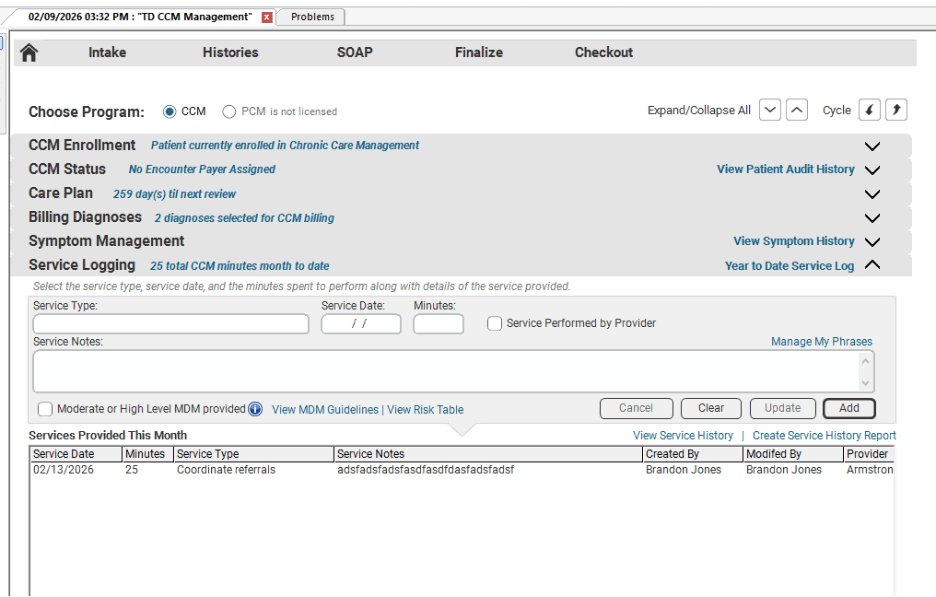
Audit anxiety is real, but having the right data in place completely changes that. The enhanced CCM Management Template gives your team an easy way to track every patient’s administrative status. You get a clear view of enrollment dates and a dedicated spot to log patient consent and the exact day it was given.
Crucially, the template also makes it simple to document when a patient decides to decline services. Tracking declines is incredibly important because it keeps your data clean and prevents your staff from accidentally hounding people who have already said no. This clear documentation trail keeps your practice compliant, respects your patients' wishes, and gives your billing team the exact proof they need.
Care Plan Documentation That Supports the Full Patient Picture
A care plan shouldn't be a useless document that you fill out once and never look at again. It needs to be a practical tool that guides the entire care team. The enhanced CCM Care Plan Template helps your clinicians document the full patient picture without the usual headache. It includes organized sections for health concerns, long-term goals, specific interventions, and active care team members.
It also includes dedicated fields for functional and cognitive assessments, which are essential for tracking how a chronic disease is progressing over time. Having all of this information in one scannable place makes care transitions completely seamless. Any provider can instantly understand the current treatment plan from the care plan, whether specialist or urgent care.
Easier CCM Time Tracking Across Patient Interactions
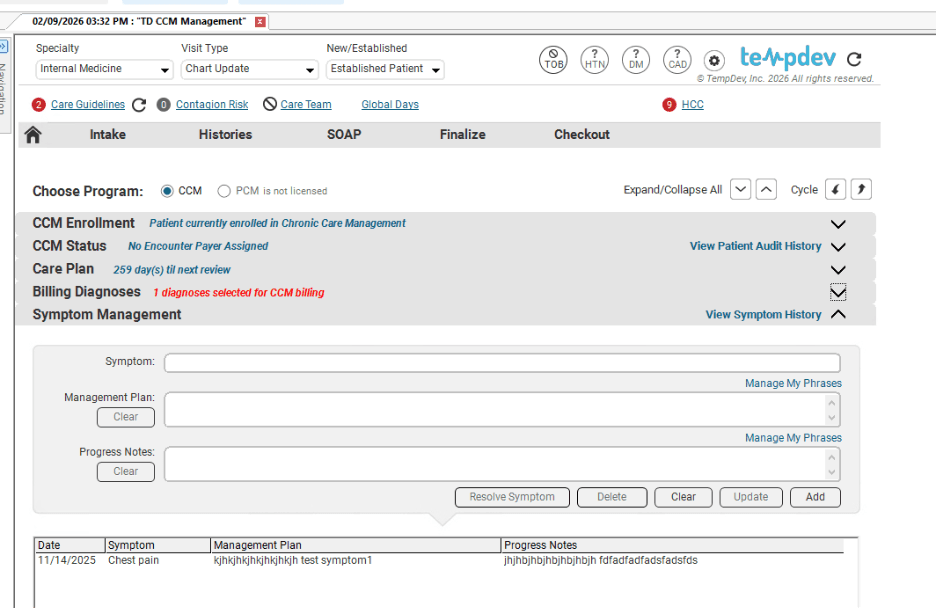
Let’s face it, the main reason practices lose out on CCM revenue is that tracking time is a pain. Care managers do great work, but logging minutes often comes last amid calls and urgent patient needs. The CCM 2.0 suite solves this by embedding time tracking right into the tools your team uses every day.
With the updated Telephone Call Template and Provider Test Action Template, your staff can log their minutes the exact second they finish an interaction. Whether they are handling a quick phone call, a face-to-face visit, or behind-the-scenes care coordination, the time gets captured. The suite includes a handy Add CCM Time button right in the action panel. Providers can log their time with a single click without switching screens or manually typing in timestamps, which saves a massive amount of administrative time.
Final Takeaway
Ultimately, Chronic Care Management works beautifully when your team has an unobstructed view of the patient's status. You need to see consent, enrollment, care goals, and logged minutes in real time. When that data is hidden behind clunky menus and manual spreadsheets, your program is always going to struggle.
TempDev’s Chronic Care Management 2.0 Template Suite helps NextGen users cut out the manual busywork, stay compliant, and maximize their monthly reimbursements. It’s about making the software work for your team, not the other way around. Ready to get your care management program running like a well-oiled machine? Reach out to the team at TempDev today to see how we can help.
Interested?
Agree with our point of view? Become our client!
Did you enjoy this read? Feel free to share it with your contacts.