


Quality Measure Status You Need When You Need to See It
When an organization decides to participate in quality programs such as MIPS, Advanced APM, HEDIS, and UDS they need to develop a NextGen EHR quality strategy. Most of us, familiar with the NextGen EHR Adaptive Content Engine (formerly known as the KBM), know it does a great job capturing the data elements needed to chart a patient visit thoroughly. It displays the information needed to ensure quality care throughout the process. However, typically, the information is in disparate areas, and the quality measure status is non-obvious. There is also no easy mechanism for automatically submitting CPTII codes. So what is the solution for getting the physicians to be proactive with the quality measure status of a patient at the point of care? The NextGen EHR Quality Dashboard Template from TempDev.
Multi-Prong Approach to Improving Quality Scores
When organizations are looking to improve the quality scores, they must implement a multi-prong approach to improving patient care:
Population Health Solution – A Population Health Solution, such as NextGen Population Health, is critical for viewing your patients as a whole and understanding who is most at risk. These solutions will assist in: population health analytics, risk stratification, identifying gaps in care, care coordination, and risk coordination.
Reporting & Data Extracts – You will need a robust reporting solution, or even a business intelligence software such as Power BI, to provide your clinics and payers with information to help close gaps in care.
NextGen EHR Quality Dashboard Template – What better time to close the gaps in care and understand what should be done for a patient, then while the patient already has a visit with you? Beginning a visit with our dashboard has proven to be one of the most effective ways to improve quality scores.
A Proactive Solution to Improve Your Quality Bottom Line
The NextGen EHR Quality Dashboard Template is specifically designed to evaluate patient performance with an eye on the measures that matter: HEDIS, ACO/Advanced APM, MIPS, UDS, and others. In this complex healthcare environment, improving quality scores across these measures isn't the only key for the heath of patients - it's vital for the continuing growth and success of the organization as a whole. Managing quality scores are critical. You need high-quality scores across the board to bring in new patients, ensure compliance, and maintain payer reimbursements.
NextGen EHR templates were designed to document patient care - and they do it exceptionally well. TempDev's Quality Dashboard Template brings improving quality scores to the next level. It combines excellent documentation capabilities with the agile, flexible, business-friendly options that make it key to ensure the highest scores possible when it comes to quality.
With the point of care Quality Dashboard template, physicians, nurses, and other users can quickly get the information they need to take action on measures not yet met for each patient. With only a click, clinicians see a comprehensive snapshot of the patient's status - advising them on the different things that need to get done for a proactive quality of care. For a busy office, this type of easy-access information is essential to keep patient care flowing smoothly. It's easy to check the status of gaps in care that must be closed to secure high quality scores. That includes everything from following up on preventative care to chronic condition management. The Quality Dashboard ensures that your practice will not miss any opportunities to enhance the care you give your patients.
Another benefit to the TempDev NextGen EHR Quality Dashboard? It's customizable. Our specialists work with your practice to tailor the Dashboard to only track the specific quality measures your organization is targeting. We'll help design the Dashboard to your practice's unique needs and specifications, helping to cover all of the quality measures you're looking to improve. If we don't have a measure available in our library of over 50 pre-programmed measures, we will work with you to build a new one that aligns with NCQA specifications.
Also, the Quality Dashboard helps to streamline the process of submitting CPTII codes. With the Quality Dashboard, CPTII codes get automatically sent only to the payers you want. For a busy office with lots of paperwork flying around, this automatic process is a significant time-saver.
Want to know more about the program? Let's dig deeper!
The NextGen EHR Quality Dashboard In Depth
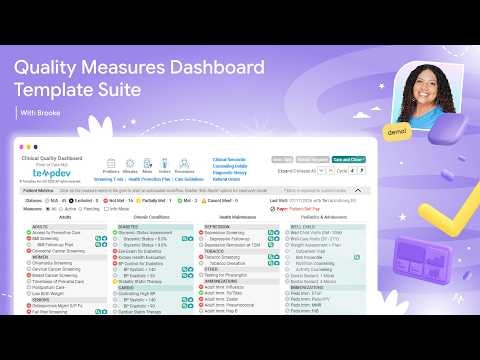
The NextGen EHR Quality Dashboard provides a comprehensive look at a patient's care when opened - allowing for a proactive, optimized patient care. When a user opens the template, they'll be able to find a wide range of information to assist in closing gaps in care.
The measures are indicated with a green (measure met), yellow (measure partially met), and red (measure not met) icon to notify the clinician know what needs to happen to close the care gap. These indicators take into account the patient's age, gender, and diagnosis to pinpoint exactly what needs to be completed for the patient. A provider can click on the outstanding measure to immediately take action to try to complete it. The measures are separated out into the following categories:
Preventative Care: Children and Adolescents
Weight assessment & plans
Well-child visits
Immunizations
Lead screening
Proper treatment: UTI & pharyngitis
ADHD medications
Preventative Care: Women, Adults, and Seniors
Chlamydia & cervical cancer screening
Breast cancer screening & mammogram tracking
Prenatal/postpartum care
BMI assessment
Access to preventative care
Monitoring persistent meds
Proper treatment: bronchitis
Colorectal cancer screening & colonoscopy tracking
Osteoporosis management
Fall risk
Advance care planning
Medication review
Post-discharge medication review & reconciliation
Functional status assessment
Pain assessment
Care Management: Specific Conditions
Asthma
Medication management
Medication ratio
Diabetes
Hemoglobin A1c testing
Diabetes retinal/dilated eye exam
Nephropathy screening
Blood pressure control
Statin therapy
Cardiac issues
Beta blocker use after AMI
Controlling high blood pressure
Statin therapy
Rheumatoid Arthritis
Anti-rheumatic drug therapy
COPD
Spirometry testing
Management of exacerbation
Mental health
Depression monitoring
Antidepressant management
Depression Follow-up PHQ-9
Substances
Tobacco
ER follow-up for alcohol & drugs
Usage of high-risk medications, including opioids and benzodiazepines
Community Health (UDS)
Flu vaccination
Pneumococcal vaccination
Tdap vaccination
TB screening
Lipid disorders screening
Activities of daily living
High BMI diabetes screening
Care coordination visit
New HIV diagnosis
Aspirin use for IVD
Along with the measure tracking, the following is also displayed for assistance:
Payer, providing a look at the patient's primary insurance.
PCP, detailing the Primary Care Provider (if noted) and the date for the last visit.
A detailed Legend, with a red/green/yellow indicator for a measure, alongside applicability
Procedures, allowing for review of what procedures have been performed on the patient
Problems, Medications, and Allergies modules
Orders module to quickly send out labs or radiology so the patient can complete them
Care Guidelines to deliver a full breakdown of outstanding guidelines on the patient
The process for updating a measure? It's very simple. Just click on the measure to open the template or module that allows for measure documentation. From there, document the necessary information to meet the measure. When a user enters the documentation and returns to the Dashboard, the measure status icon will turn to a green indicator. After that, the CPTII & ICD10 codes that will be submitted are displayed.
How TempDev Can Help
Interested in seeing what this TempDev solution can provide your organization? If you're concerned about your practice's current quality scores - or want to maintain your current ranking - TempDev's NextGen EHR Quality Dashboard offers a comprehensive, engaging way to keep that quality high and the practice humming. It provides an easy, customizable way to maintain high-quality scores and streamline the process of automatically submitting CPTII codes.
Interested in seeing what TempDev can do for you? Want to see how this Quality Dashboard solution can help boost your patients' care and your office's bottom line? Call us for a demo at 1-888-TEMPDEV or Contact us here!
Ready to get more of your NextGen system?
Help your organization achieve measurable improvements in efficiency, compliance, and performance.