
How to Plan a NextGen EHR and EPM Upgrade Without Workflow Disruption

A NextGen upgrade can unlock new functionality, close compliance gaps, and improve interoperability. It can also disrupt the workflows your team relies on every day if it is not carefully planned. The technical install is only part of the project. The real work is reducing risk and protecting daily operations while the system changes underneath your staff. Learn how healthcare organizations can prepare, test, train and manage a NextGen upgrade with the help of TempDev.
A NextGen Upgrade Affects More Than the Software Version
A NextGen upgrade is an organization-wide project, not a routine technical update. New versions can change clinical and administrative workflows. Existing templates and customizations may behave differently once the system is upgraded. Reports, interfaces, and connected systems often need fresh testing, and security roles or configurations can shift as well.
Consider the following:
Staff may need training on new or changed functionality
Regulatory or certification requirements can create firm deadlines
Skipping preparation often leads to disruption right after go-live
The goal is not simply completing the technical upgrade. Your organization also needs to protect the workflows and information your people depend on every day. That is the thinking behind how we approach every NextGen EHR upgrade and NextGen EPM upgrade at TempDev.
Why Healthcare Organizations Need to Keep NextGen Current
Organizations pursue a NextGen EHR upgrade or NextGen EPM upgrade for several practical reasons, including:
Staying on a supported software version
Addressing security and system maintenance needs
Meeting changing regulatory and certification requirements
Gaining access to new features and workflow improvements
Improving interoperability and data exchange
Correcting known issues from earlier versions
Preparing for new modules, tools, or integrations
Every NextGen EHR upgrade and NextGen EPM upgrade looks a little different because organizations sit on different versions with different customizations.
When Should an Organization Begin Planning Its NextGen Upgrade?
Planning your NextGen upgrade should start well before the scheduled date. Begin early when:
NextGen announces a new required or strategic release
The current version is approaching the end of support
Regulatory deadlines affect certified functionality
Current limitations are affecting workflows or integrations
The organization plans to add new features or modules
Another project depends on the upgraded environment
The organization has not upgraded in several release cycles
Beyond the technical installation itself, the timeline should account for planning, testing, remediation, training, and scheduling.
What a NextGen Upgrade Readiness Review Should Include
A readiness review sets the foundation for the entire NextGen upgrade.
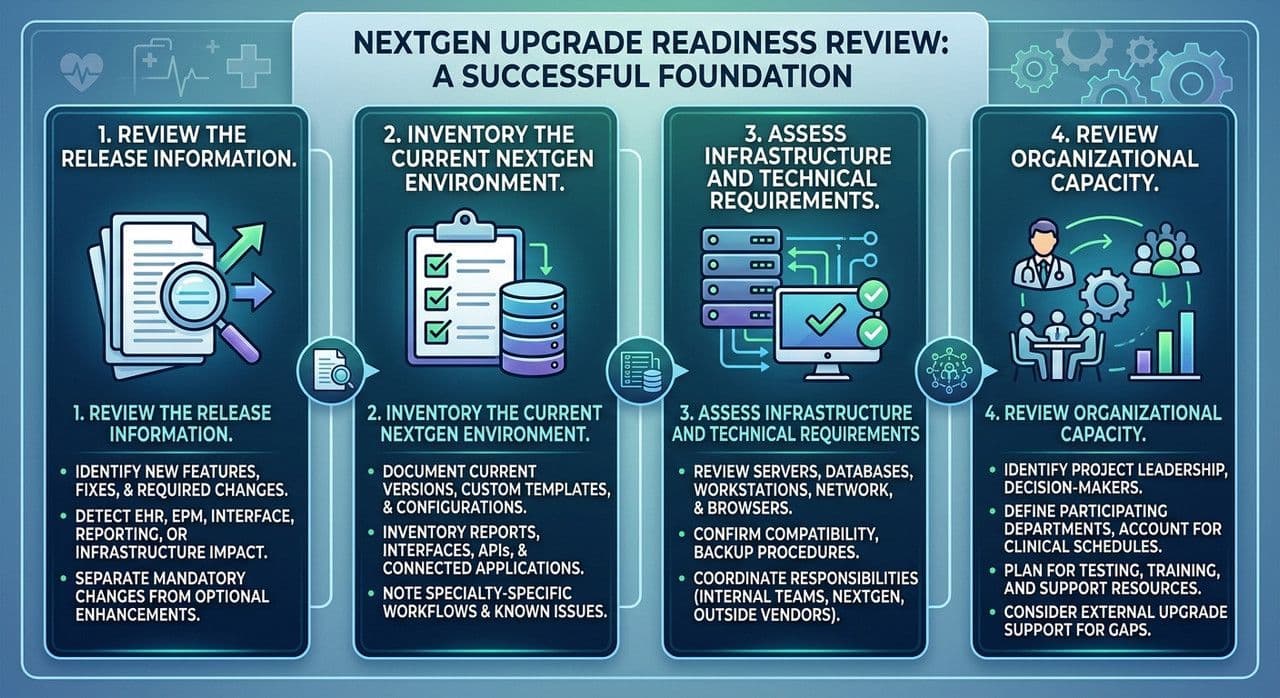
Review the Release Information
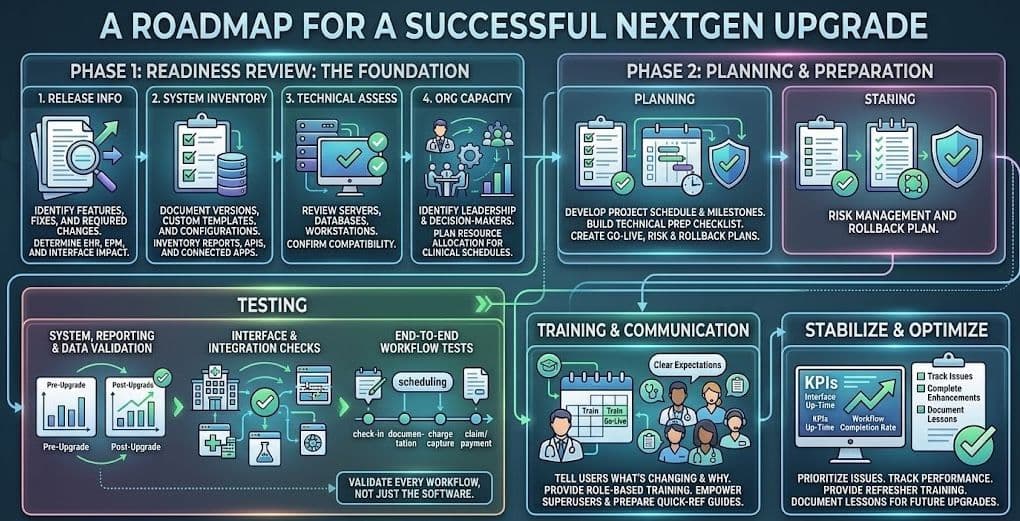
Identify new features, fixes, and required changes. Determine which changes affect the EHR, EPM, interfaces, reporting, or infrastructure, then separate mandatory changes from optional enhancements.
Inventory the Current NextGen Environment
Document current versions, custom templates, and configurations. Inventory reports, interfaces, APIs, and connected applications. Note specialty- or location-specific workflows, plus any known issues to resolve during the project.
Assess Infrastructure and Technical Requirements
Review server, database, workstation, network, and browser requirements. Confirm compatibility with connected technologies and backup procedures, and coordinate responsibilities among internal teams, NextGen, and outside vendors.
Review Organizational Capacity
Identify project leadership, decision-makers, and the departments that must participate. Account for clinical schedules, then plan for testing, training, and support resources. You may consider bringing in TempDev's NextGen upgrade support at this stage to fill gaps in staff time or expertise.
Build a Clear NextGen Upgrade Plan
A strong plan connects technical tasks to their operational effects. It should include scope and objectives, project leadership, an upgrade schedule with major milestones, and a technical preparation checklist. It should also cover customization and interface review, testing strategy, user communication, go-live coverage, and risk or rollback plans. ONC's SAFER Guide for selecting or upgrading health IT offers a useful framework for tailoring technology and workflows to your goals.
Test the Complete NextGen Workflow, Not Just the Software
Because a NextGen upgrade touches multiple clinical and financial workflows, comprehensive testing is essential before any production use to validate the entire ecosystem.
System, Configuration, and Regression Testing
Confirm that core functions operate correctly and security roles are accurate. Templates, documents, and tasking should behave as expected after configuration changes.
Interface and Integration Testing
Validate inbound and outbound interfaces so data reaches the correct charts and accounts. Test labs, hospitals, pharmacies, payers, and portals, and verify error handling and reconciliation.
Reporting and Data Testing
Confirm that operational, financial, clinical, and quality reports still function. Validate calculations, then compare outputs with the pre-upgrade environment. ONC's EHR system testing plan is a helpful reference for structuring these checks.
End-to-End Workflow Testing
Test scheduling through check-in, documentation through charge capture, and claims through payment and follow-up. Include representative specialties, locations, and user roles, because end-user participation uncovers issues technical testing alone can miss.
Prepare Users for Changes Before Go-Live
A strong communication and training plan reduces go-live disruption by setting clear expectations early. Tell users what is changing and why, and focus training on the changes that affect their daily responsibilities using role-based examples and realistic workflows. Prepare superusers and support teams first, provide quick-reference materials, and explain how staff should report problems. Even small changes can frustrate users who encounter them without warning, so schedule refresher support after go-live as well.
ONC's SAFER Guide for implementing health IT outlines similar safety practices organizations can apply when rolling out system changes.
Stabilize and Optimize After the Upgrade
Once the technical upgrade is complete, track and prioritize reported issues. Monitor interfaces, workflows, performance, and reports closely, and confirm that critical tasks continue without interruption. Provide additional training where confusion patterns appear, then complete deferred enhancements once the environment is stable. Compare the results with your original goals and document lessons learned for the next upgrade.
How a Well-Managed Upgrade Helps Work Flow Better
A well-managed NextGen upgrade protects critical workflows, reduces unexpected interruptions, and gives users time to understand new functionality. It also identifies outdated processes and creates opportunities to improve usability. Upgrading should not add unnecessary complexity. It should give both your technical and operational teams a safer, more current environment across both NextGen EHR and NextGen EPM.
How TempDev Uncomplicates NextGen Upgrades
TempDev provides NextGen upgrade consulting across the EHR, EPM, and custom clinical templates. Our NextGen upgrade consulting team handles upgrade planning, project management, and risk management. We review custom templates, reports, interfaces, and configurations, then build a development and testing strategy and coordinate validation. We also deliver workflow-based user training and go-live support.
When organizations need additional capacity, our NextGen upgrade support includes NextGen staff augmentation. We also coordinate among client teams, NextGen, and other vendors. For a closer look at our approach, see our checklist for a successful NextGen upgrade. Our recent guide also covers getting strategic value from a NextGen Enterprise 8.3.1 upgrade. Organizations preparing for certification-related changes can also review ONC's certification requirements for context.
Prepare for Your Next NextGen Upgrade With Confidence
A successful NextGen upgrade requires early project planning, a complete inventory, thoughtful template development, thorough testing, clear communication, and post-go-live follow-through. TempDev's NextGen upgrade consulting and NextGen upgrade support help organizations manage the technical upgrade. Just as important, we help manage its effect on the people who rely on NextGen every day.
Ready to plan your next NextGen EHR upgrade or NextGen EPM upgrade? Contact TempDev to talk through your timeline and next steps.
Ready to get more of your NextGen system?
Help your organization achieve measurable improvements in efficiency, compliance, and performance.